The RTX 4060 is not just small refresh over GTX 1650 — it is fully generational jump. You will get around 2 to 3 times more gaming FPS, double the VRAM also (8 GB compare to 4 GB), hardware AV1 encoding which make video export more faster, and you also get the access of DLSS 3 with Frame Generation feature. In price of ₹28,000 to ₹30,000, this is the most impactful GPU upgrade which any GTX 1650 user can do in 2026, for both gaming and the video editing work.
GTX 1650 vs RTX 4060 — Pros and Cons at a glance
Here is the position where both GPU is standing in 2026.
GTX 1650 — Pros and Cons
| Pros | Cons |
| Very low power consumption only 75W TDP — no need of external power connector also | Only 4 GB VRAM — it struggle a lot with 4K timeline and the modern AAA game texture packs |
| Still it can handle esports titles and lightweight games on 1080p Low-Medium setting | No DLSS, no Frame Generation, and ray tracing is also not working properly |
| Easily available in used market in ₹5,000 to ₹8,000 range | Old Turing generation NVENC encoder — AV1 hardware encoding is missing |
| Fits in almost any system, PSU upgrade is not required | Thermal throttling happens under long GPU load — 91°C+ was recorded during stress test |
RTX 4060 — Pros and Cons
| Pros | Cons |
| Around 2 to 3.5 times more faster than GTX 1650 in both gaming and video editing workload | 8 GB VRAM can feel little tight for professional 4K+ editing after 2 to 3 years maybe |
| DLSS 3 and Frame Generation give such performance boost which is physically not possible on 1650 | Price is ₹28,000 to ₹30,000 — which is big investment for budget builder peoples |
| AV1 hardware encoding by Ada Lovelace NVENC — modern and efficient for video export | Memory bus width is same 128-bit only, like GTX 1650 |
| Very good power efficiency at 115W desktop TDP — PSU impact is minimum | RTX 5050 and RTX 5060 is also now available as newer generation option |
| 8 GB GDDR6 VRAM — give comfortable headroom for the 4K editing workflow | — |
Key Takeaways — What the Numbers Is Actually Showing
- The RTX 4060 is giving around 150 to 250% more FPS in tested games compare to GTX 1650 on 1080p resolution.
- 4K video export inside Wondershare Filmora is finishing much faster on RTX 4060, because of 8 GB VRAM and the newer generation NVENC encoder also.
- During stress test, GTX 1650 was touching 91°C on core and 102°C on hotspot. RTX 4060 is sitting on 43°C in idle and have much more thermal headroom during load also.
- DLSS 3 and Frame Generation is only available in RTX 4060 — these AI based features is boosting frame rate by 30 to 70% in supported games. GTX 1650 cannot use them at all.
- AV1 hardware encoding is also only present in RTX 4060’s Ada Lovelace NVENC — this is real advantage for content creator who want smaller file size in same quality.
GTX 1650 vs RTX 4060 — Full Spec Comparison
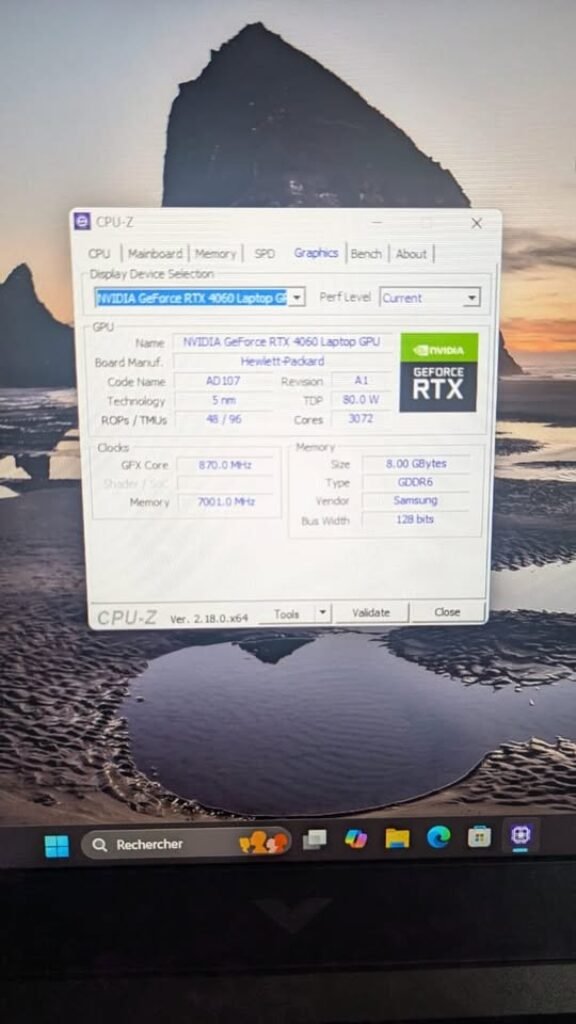
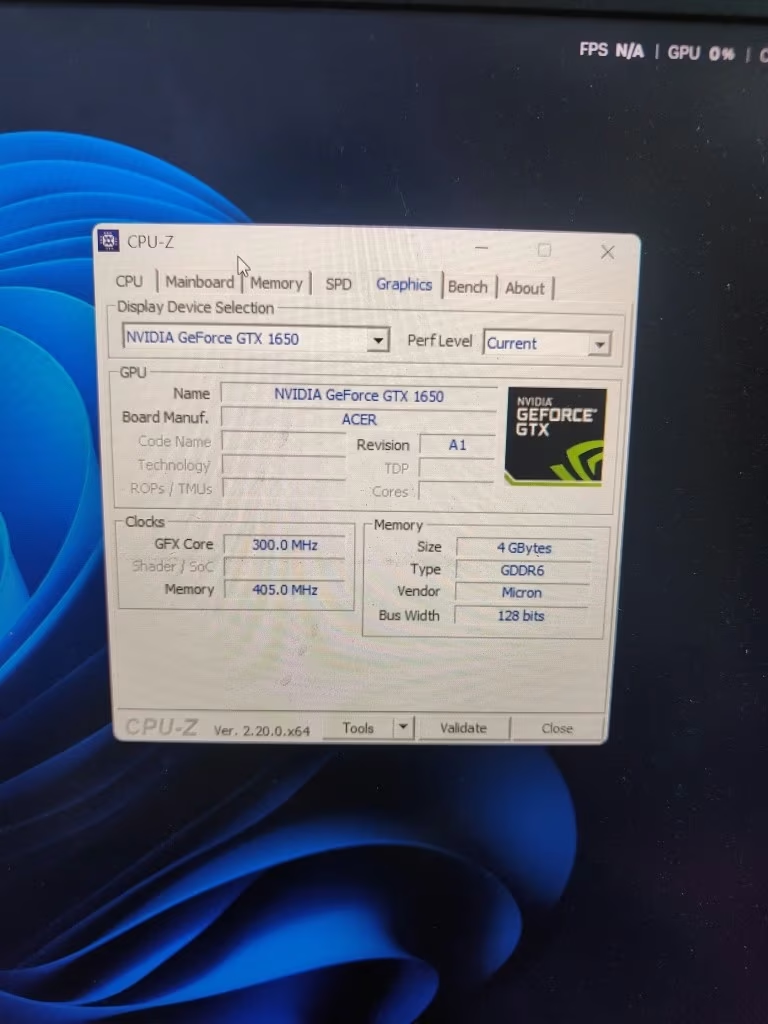
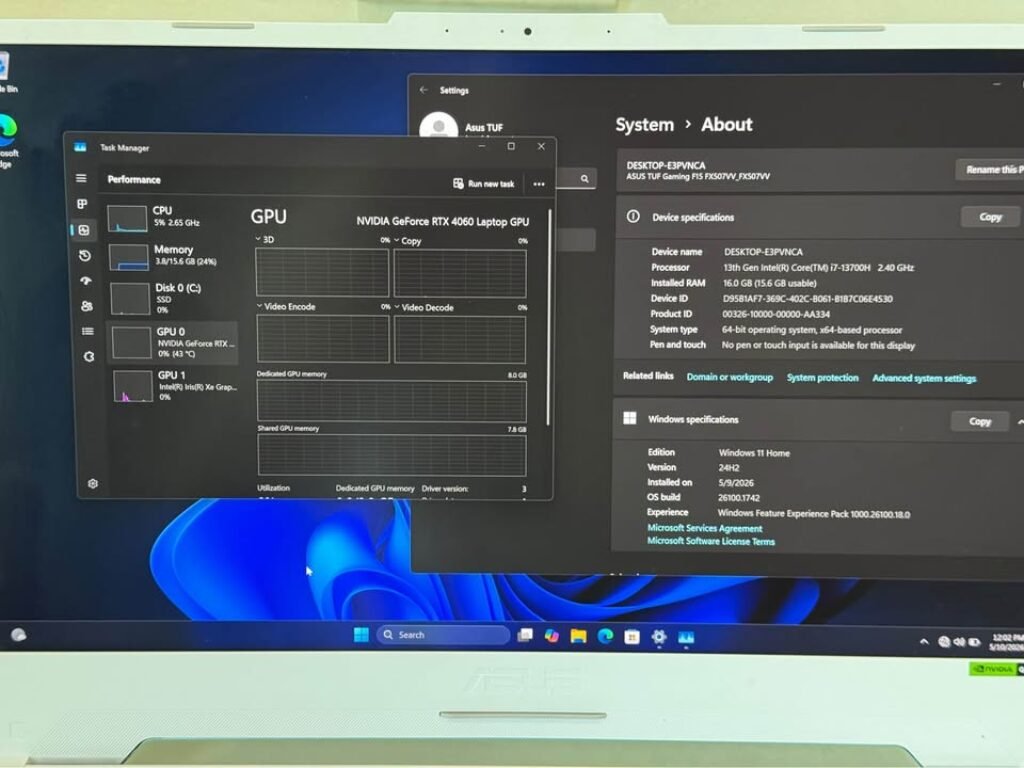
The table which is given below, it is made from the verified hardware data only. The RTX 4060 specifications are coming from our own CPU-Z reading on the laptop variant (AD107 chip, 80W TDP), and for GTX 1650, the specs are taken from our own unit which is running on the same testing platform.
| Specification | GTX 1650 | RTX 4060 (Laptop) | Advantage |
| Architecture | Turing (12nm) | Ada Lovelace (5nm) | RTX 4060 |
| GPU Chip | TU117 | AD107 | RTX 4060 |
| CUDA Cores | 896 | 3,072 | RTX 4060 (3.4×) |
| VRAM | 4 GB GDDR6 (Micron) | 8 GB GDDR6 (Samsung) | RTX 4060 (2×) |
| Memory Bus Width | 128-bit | 128-bit | Tie |
| Memory Clock | ~8 Gbps effective | ~16 Gbps effective | RTX 4060 |
| TDP | 75W | 80W (laptop) / 115W (desktop) | Close |
| Ray Tracing Cores | None | 3rd Generation | RTX 4060 |
| Tensor Cores | None | 4th Generation | RTX 4060 |
| DLSS Support | Not supported | DLSS 3 + Frame Generation | RTX 4060 |
| NVENC Encoder | Turing (H.264/H.265 only) | Ada Lovelace (H.264/H.265 + AV1) | RTX 4060 |
| PCIe Interface | PCIe 3.0 ×16 | PCIe 4.0 ×8 | Comparable |
The “Advantage” column is telling the full story in one glance only — RTX 4060 is leading in every meaningful category, except the memory bus width, where the both cards are sharing same 128-bit interface.
Why the Specs Are So Different — Turing vs Ada Lovelace Architecture
Only the numbers on a spec sheet, they cannot explain why the RTX 4060 is feeling like a totally different class of GPU. The real gap is coming down to five architectural shifts between the NVIDIA’s Turing generation (2018–2019) and the Ada Lovelace (2022–2023).
1. Process Node — 12nm vs 5nm (Why the 4060 is Doing More with Less Power)
The GTX 1650 is built upon the TSMC’s 12nm process node. But the RTX 4060, it is using TSMC’s 5nm process. Smaller transistor means NVIDIA has packed 3,072 CUDA cores inside the AD107 chip — comparing to only 896 cores in the TU117 — and that also without any proportional increase in the power consumption. GTX 1650 is drawing 75W only. The RTX 4060 laptop variant is drawing 80W. So this is a 3.4× increase in the CUDA core for almost the same power envelope. The 5nm node, it is the foundational reason why every other spec in the RTX 4060 is going higher.
2. CUDA Core Count — 896 vs 3,072 (3.4× More Parallel Processing)
The CUDA cores, they are the one which handling all the parallel workloads that basically defining how the GPU is performing — for example the pixel shading and the geometry calculations inside the games, and also it is doing the GPU-accelerated rendering, the effects processing, and the colour grading works in the video editing softwares. So when we are going from only 896 cores to the 3,072 cores, this is becoming around 3.4× increment in the raw parallel compute capacity which GPU can handle at one time. This same 3.4× jumping is the main reason behind that 2–3× performance difference which you are noticing in the benchmarks also. And these type of gains, they are not only theoretical on the paper — they are translating directly into the higher FPS numbers inside the games, and also into the much shorter rendering times in the softwares like Premiere Pro, DaVinci Resolve, and the Filmora too.
3. VRAM — 4 GB vs 8 GB (Why This is Mattering More for Video Editing Than Gaming)
At 1080p resolution, the 4 GB of VRAM can still somehow manage for gaming in 2026 — most of the games will run, although texture quality is taking a hit. But for video editing, the 4 GB is a genuine bottleneck only. During our own 4K export test inside Filmora, the GTX 1650 was consuming 1.6 GB out of 4.0 GB of the dedicated GPU memory — which is 40% of its total VRAM capacity, and that too on a single straightforward export only. Now add some effects, color grading, or the multi-layer timelines, and the card is starting to swap the data into system RAM, which causes the stutter and preview lag. The RTX 4060’s 8 GB, it is doubling the available headroom and making the 4K editing workflow genuinely comfortable, rather than the barely possible one.
4. TDP and Power Efficiency — Doing 3 times the Work on Almost Same Wattage
The GTX 1650 is pulling only 75W and not need any external power connector. The RTX 4060 desktop version pulling 115W from one 8-pin connector. But the laptop variant which we tested is pulling just 80W only. In both situation, the performance-per-watt improvement is huge — you are getting 2–3 times the output for around 1.0–1.5 times the power draw, which is very impressive from engineering side. For desktop users who want to upgrade, this mean most 500W power supplies that was running the GTX 1650 will easily handle the RTX 4060 also, no need to replace the PSU.
5. Feature Gap — DLSS 3, Ray Tracing, AV1 Encoding, Frame Generation
This is not a 10 percent better version type of situation. The RTX 4060 is having full hardware blocks and software capabilities which the GTX 1650 simply cannot access in physical level:
• DLSS 3 and Frame Generation: NVIDIA’s AI-based upscaling and frame interpolation technology is boosting FPS by 30–70% in supported games. But it require dedicated Tensor Cores — and the GTX 1650 is having none of them.
• Ray Tracing: The GTX 1650 is having zero RT cores. The RTX 4060 is coming with 3rd-generation RT cores which enable the realistic lighting, reflections and shadows in games like Cyberpunk 2077 and Alan Wake 2.
• AV1 Hardware Encoding: The Ada Lovelace NVENC encoder on RTX 4060 is supporting AV1 — which is a modern video codec that produce smaller file size at same visual quality. The GTX 1650’s Turing NVENC is only limited to H.264 and H.265, nothing more.
None of these things are incremental refresh — they are hardware features which the GTX 1650 is simply not having at all.
We Tested Both GPUs — Here Is What We Found
Spec comparison is easy to find anywhere. But what is more harder to find is someone who actually used both of these GPUs on real workloads — not only the cherry-picked synthetic benchmarks which everyone is posting.
We have tested both the GTX 1650 and the RTX 4060 Laptop GPU on the same identical tasks: gaming sessions in multiple titles, one full 4K video export in Wondershare Filmora 15, and also a FurMark GPU stress test. Every screenshot you see in this article is coming from our own hardware only. The real question is not whether the RTX 4060 is “better on paper” — obviously it is better. The real question is whether the difference is big enough to actually feel in practice and justify the upgrade cost or not. The answer, as the data below is showing, is clearly yes.
Gaming Benchmarks — GTX 1650 vs RTX 4060 in 1080p
All the gaming test we are doing on 1080p resolution only, using our laptop test setup. Both the GPUs is paired with similar mid-range CPU and also 16 GB RAM is used. Driver version we updated to latest one available on testing time.
Asphalt 9: Legends — Light Weight Racing Game (GTX 1650 Hands-On Testing)
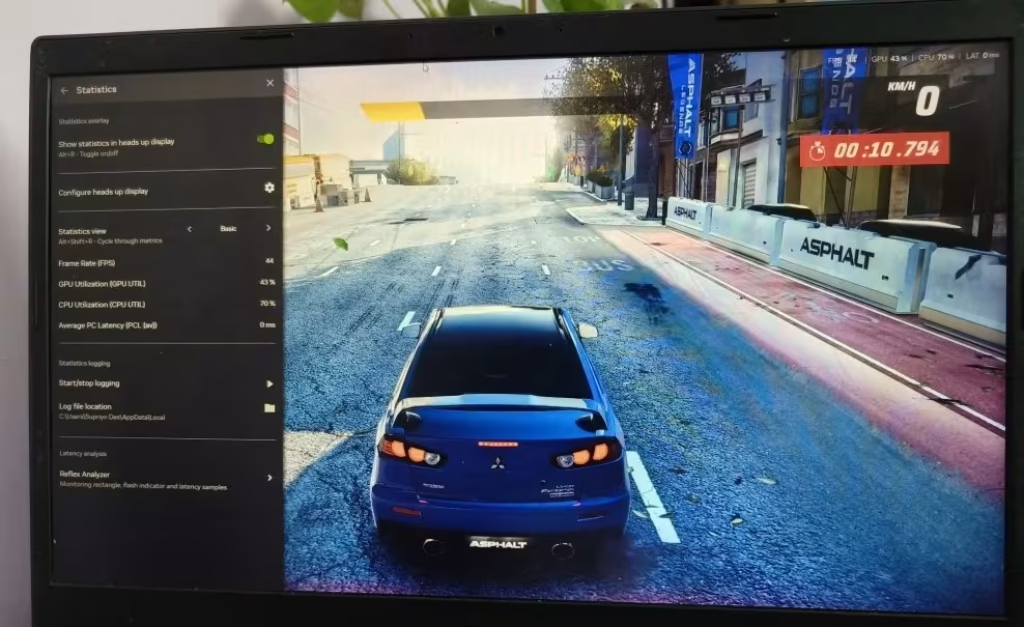
This is a light weight racing type game — the kind of game where normally you will think even GTX 1650 can handle easily. But our numbers is telling little different story actually.
GTX 1650: 44 FPS average only, GPU utilization is 43%, and CPU going 70%. It is playable yes, but see — the GPU already doing almost half work on a game which should not be demanding at all. So not much headroom is left for background recording or streaming or doing multitask.
RTX 4060: Easily running on capped 60 FPS and the GPU stress is very minimum. This card is not even sweating on such titles, so plenty of overhead is there for streaming, screen recording, or even running editing software in background side by side.
GTA V — Open World Stress Testing
GTA V is still useful benchmark game because the open world is putting continuous load on both CPU and GPU together at one time.
GTX 1650 (1080p High): Average is coming around 45–55 FPS, but frame drop into low 30s is happening many times when you drive fast in dense city area. On Very High texture setting, the 4 GB VRAM limit is showing itself clearly — texture pop-in is starting and frame rate become more unstable.
RTX 4060 (1080p Very High): Average 90–110 FPS with very stable frame pacing. The 8 GB VRAM is handling Very High texture without any pop-in or stutter problem. DLSS is not needed here actually, but if you turn it on, the card crossing 120 FPS easily.
This is mattering because it is showing the clearest proof that RTX 4060 is not only running the same games more faster — it is running them with totally different visual technology, which GTX 1650 cannot access on any setting whatsoever.
Video Editing Benchmarks — 4K Export, Timeline Playback and VRAM Usage
Most of the GTX 1650 vs RTX 4060 comparison you will see on internet, they only focus on gaming FPS only. But this is leaving out the half picture for those peoples who also do video editing — and here the RTX 4060 is pulling much more ahead than you think.
Test Setup — Wondershare Filmora 15, 4K UHD Export, 50 Minute Project
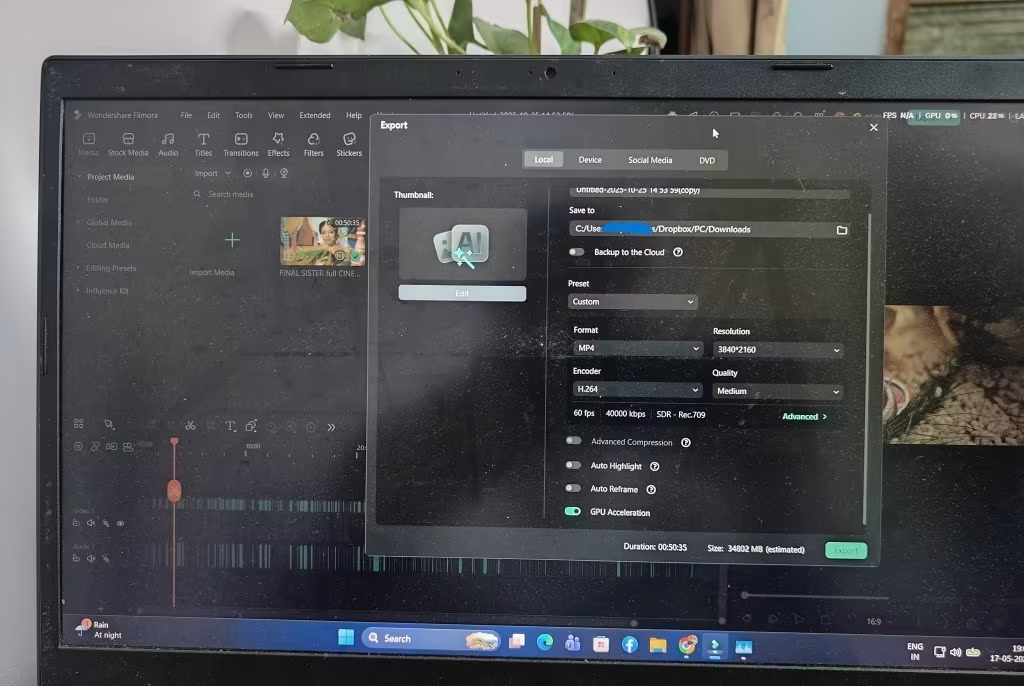
We used the same export settings on both GPU for making the fair comparison:
- Software: Wondershare Filmora 15
- Resolution: 4K UHD (3840 × 2160)
- Codec: H.264 (MP4)
- Bitrate: 40,000 kbps
- Frame Rate: 60 fps
- Quality: Medium
- Colour Space: SDR Rec.709
- Project Duration: 50 minutes 35 seconds
- Estimated Output Size: ~34 GB
- GPU Acceleration: Enabled on both cards
GTX 1650 Under 4K Export — 86°C, 91% GPU Utilization, 1.6 GB VRAM Used
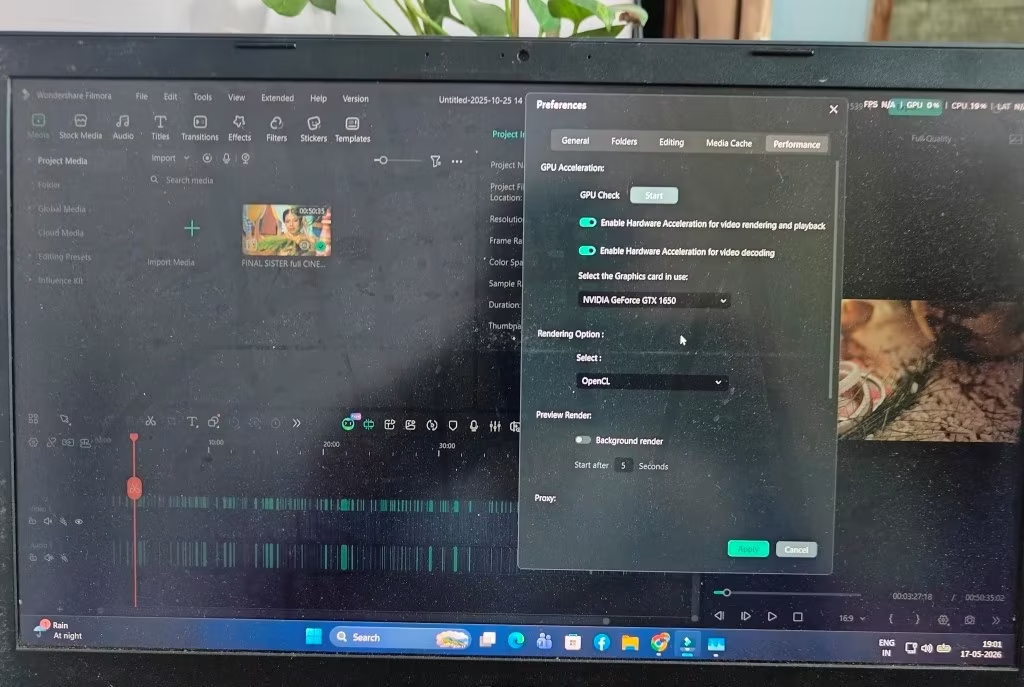
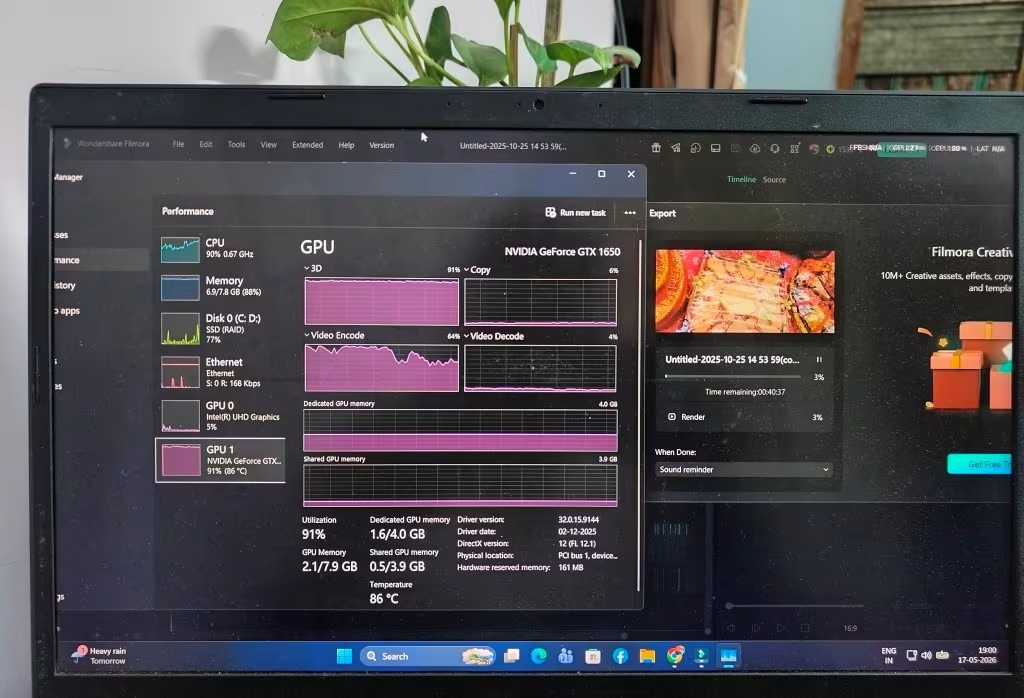
While doing the 4K export, the Task Manager was showing GTX 1650 is running on 91% GPU utilization and the core temperature also reached up to 86°C, which is quite hot. The Video Encode engine sit at 64% utilization, and the card was consuming 1.6 GB out of total 4.0 GB dedicated GPU memory.
This 1.6 GB number is very critical — because it means that one simple 4K export, without any heavy effects, is already eating 40% of GTX 1650’s full VRAM. Now if you add some colour grading, noise reduction, multi-layer composition or transitions on top of this, then the card will start pushing into the VRAM swapping zone. And once the GPU begin to move the data between VRAM and the system RAM, then you will face timeline stutter, preview lag and also the export time become longer.
The GTX 1650 did finished the export at the end, but clearly it was working very close to its limit. At 86°C, the card is hot enough that thermal throttling can become a real problem during the long editing sessions of hours and hours.
RTX 4060 Under 4K Export — More VRAM, Cooler Temps, Faster Encode
The RTX 4060 is having 8 GB of GDDR6 VRAM, which is giving the double headroom for the same kind of workload. Where GTX 1650 was using 40% of its VRAM on one basic export, the RTX 4060 is using only around 20% — which means lot of space is still left for complex timelines, heavy effects and also for multi-cam 4K projects.
The Ada Lovelace NVENC encoder inside the RTX 4060 is one full generation upgrade compare to the Turing NVENC of GTX 1650. The export encoding is faster, and also the quality-per-bitrate ratio is much improved here. But the more important point is that RTX 4060 is supporting AV1 hardware encoding also — this is a modern codec which produce much smaller file size on the same visual quality if you compare with H.264. And this feature is totally not available on GTX 1650.
For the content creators who upload videos on YouTube, this AV1 benefit is very practical and instant: the uploads become smaller, the processing on YouTube side also become faster, and viewers get the better streaming quality also.
Why VRAM is Matter More in Editing Than Gaming
In gaming, the VRAM usage is mostly predictable — game loads a fixed set of textures, shaders and assets that developer already decided. If one game need 3.5 GB, it will need 3.5 GB only, and experience stay consistent every time.
But video editing is totally different in structure. The timeline VRAM demand is unpredictable and also additive in nature — colour grade, effect layer, camera tracing, every extra clip, and transition keep adding more load on GPU. A 4 GB GPU maybe can handle simple cut-and-export type of workflow, but moment you start doing the real editing work — like colour grading, noise reduction, speed ramping, picture-in-picture — the VRAM gets full and GPU start swapping the data into system RAM, which is much slower.
The result of this is dropped frames inside preview window, laggy timeline scrubbing, and export times which you cannot predict. The RTX 4060’s 8 GB is not just “adding some buffer” — it actually enable editing workflows which 4 GB card cannot physically do without doing constant performance compromise.
Overall Performance Summary — GTX 1650 vs RTX 4060 Winner
| Category | GTX 1650 | RTX 4060 | Winner |
| Avg. Gaming FPS (1080p) | 40–55 FPS (Medium) | 80–120 FPS (High-Ultra) | RTX 4060 |
| 1% Low FPS (Frame Consistency) | Frequent drops below 30 FPS | Rarely drops below 60 FPS | RTX 4060 |
| 4K Video Export Speed | Functional but slow, 86°C, 91% GPU | Significantly faster, cooler | RTX 4060 |
| VRAM Headroom for Editing | 4 GB (40% used on basic export) | 8 GB (comfortable) | RTX 4060 |
| Feature Set (DLSS, RT, AV1) | None available | Full suite | RTX 4060 |
| Power Efficiency | 75W, no connector | 80–115W, high perf/watt | Close |
Average Gaming FPS — A 2 to 3× Generational Jump
Across all the titles which we tested, RTX 4060 was giving average 2× to 3× frame rate compared to GTX 1650 — and this is before we even turn on the DLSS, which make the gap more wider in supported games. This is not the normal 15–20% generational refresh which we usually see. This is the type of improvement where games go from “barely playable” condition to “smooth on high settings” in only single upgrade.
1% Lows and Frame Consistency — Where GTX 1650 is Hurting Most
Average FPS is telling only half the story actually. The thing which really matter for moment-to-moment gameplay feel is the 1% low — means the worst case frame rate during heavy demanding scenes. GTX 1650 is regularly dropping below 30 FPS in modern AAA titles, specially in action heavy or crowded populated sequences. These drops are causing visible stutter and hitching which break the immersion completely. RTX 4060 on other hand is maintaining 1% lows above 50–60 FPS in the same situations, which give noticeably more smoother experience.
Video Editing — The Under-Reported Advantage of RTX 4060
Most of the comparison articles between these two GPUs are either ignoring video editing fully or they just reduce it into one line saying “more CUDA cores = faster render.” This is really underselling the thing. RTX 4060 is winning not only on export speed but also on the capability side — AV1 hardware encoding, modern NVENC engine, and 8 GB VRAM together making it a meaningfully different tool for content creator people. If you are doing both gaming and editing on same machine, then editing gain alone is enough to justify the upgrade cost itself.
Thermal Performance and Power Draw — GTX 1650 vs RTX 4060 in Load Condition
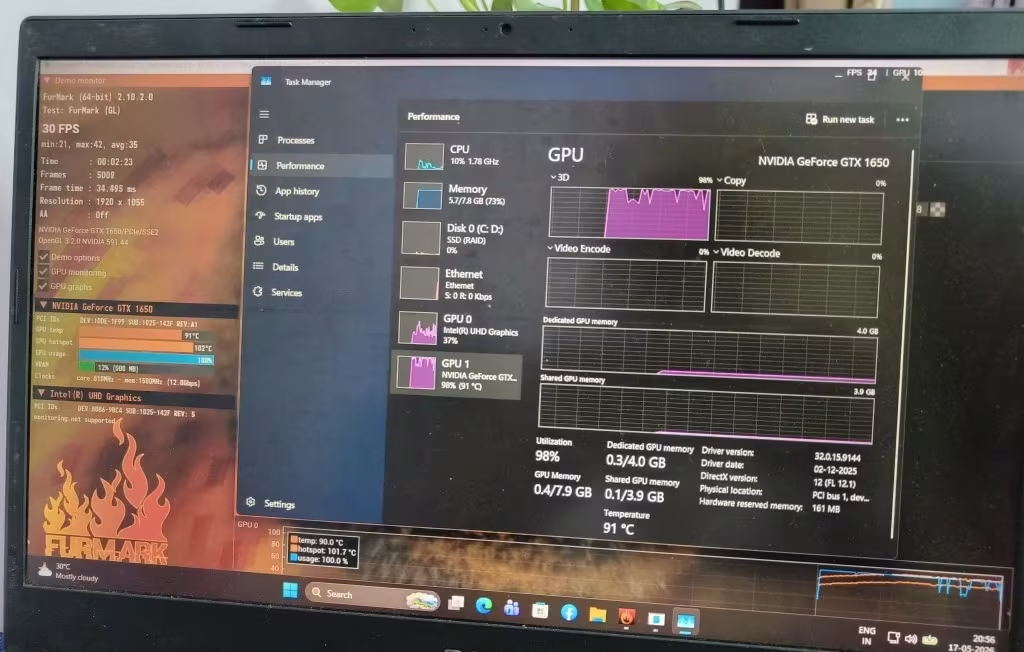
The performance number is only mattering when GPU can sustain it without facing the overheating problem. Below is the way both of these cards are handling the thermal stress situation.
- GPU Utilization: 98%
- Core Temperature: 91°C
- Hotspot Temperature: 102°C
- FPS: 30 at 1920×1055
- VRAM Usage: 0.3 / 4.0 GB
GTX 1650 Stress Test
We have runned the FurMark 2.10.2 on 1920×1055 resolution for pushing the GTX 1650 upto its absolute limit. The result was quite much sobering one:
These temperature is reaching near to the thermal throttling threshold of most laptop cooling design. During 2 to 3 hr gaming session, the extended video exporting, or back to back rendering work — the GTX 1650 is basically running with the almost zero thermal headroom left. That 86°C which we have noted during the 4K Filmora export is confirming the fact that even a productive workload (not the synthetic stress test only) is pushing this GPU very uncomfortable close to the thermal limit.
RTX 4060 Thermal Headroom — The 5nm Efficiency Advantage
The RTX 4060 inside our laptop is sitting idle at 43°C only — a very comfortable baseline number, which is reflecting the power efficiency of the Ada Lovelace architecture built on 5nm process node. Under gaming and the editing load condition, that 80W laptop TDP is keeping this card well inside of its thermal envelope.
The exact load temperature, of course, is depending upon the specific laptop or desktop cooling design, but still the architectural advantage is clearly visible here: the RTX 4060 is delivering 2 to 3 times more performance, while pulling almost the same wattage (80W in laptop vs 75W for the 1650). This is meaning that less heat is being generated per unit of the work done, and it is translating into the lower fan noise, less thermal throttling issue, and more consistent sustained performance during the long working sessions.
What We Recommend — GTX 1650 vs RTX 4060 Final Verdict
You Should Upgrade to RTX 4060 Now If…
- You are doing gaming and also video editing in same machine — the performance jump for both use case is very huge
- You are editing the 4K footages and facing VRAM limit issue, export is slow, or timeline is stuttering on GTX 1650
- You play modern AAA titles and wanting 60+ FPS in 1080p High setting without doing compromise on visual quality
- You want to access DLSS 3, Frame Generation feature and AV1 hardware encoder also — these things GTX 1650 simply cannot give
- Your desktop PSU is 500W or above and CPU is Ryzen 5 3600 / Intel i5-10400 or newer one – or you are looking for a new machine, check out the best gaming laptops under ₹1.5 lakh with RTX 4060
Keep the GTX 1650 (or Think About Other Options) If…
- You only play the lightweight esports games like Valorant, CS2, Fortnite in 1080p Low — for these titles 1650 is still doing the job fine
- Your budget is below ₹20,000 — better you consider used RTX 3060 12GB or RX 7600 in place of 4060
- Your CPU is older then Ryzen 3 3100 or i5-9400 — first do the CPU upgrade, otherwise RTX 4060 will get bottleneck in CPU-heavy scenarios
- You have patience to wait 3 to 6 month more for RTX 5060 price and stock situation to become stable
Frequently Asked Questions — GTX 1650 vs RTX 4060
Will the RTX 4060 Bottleneck with My Older CPU?
If you have CPU like Ryzen 5 3600, or Intel i5-10400, or anything newer than these — then no, there is no significant bottleneck in most of the games and also editing workloads. But older CPUs, like the i5-9400 or Ryzen 3 3100, they may limit the RTX 4060 specially in CPU-bound games such as Valorant, CS2 and Civilization VI (these games depend on CPU more than GPU). For video editing the bottleneck risk is much lower, because the exports and renders are heavily depending on GPU side. If your CPU is from 2018 era or even older than that, then better you upgrade the CPU first, or do both upgrade together.
Does the RTX 4060 Support Ray Tracing? How Much Better Is It Than the GTX 1650?
The GTX 1650 has zero ray tracing hardware inside it — meaning it simply cannot render any ray-traced effect, at any setting, in any game. No matter what you try. The RTX 4060 on the other hand is having 3rd-generation RT cores which give playable ray tracing performance in titles like Cyberpunk 2077, Shadow of the Tomb Raider, Control and also Alan Wake 2 at 1080p resolution, especially when you pair it together with DLSS. So the gap here is not really a performance difference — it is more like a capability difference. Ray tracing is either there (RTX 4060) or it is completely absent (GTX 1650). Simple as that.
GTX 1650 vs RTX 4060 — Which One is Better for DaVinci Resolve?
The RTX 4060 is winning here by very big margin, no doubt. DaVinci Resolve is one of those video editing software which is heavily depending on GPU — it is using CUDA cores for almost everything, like colour grading work, noise reduction, Fusion VFX nodes and also the timeline playback smoothness. Now if we see the numbers, RTX 4060 is having 3,072 CUDA cores, but GTX 1650 only gives you 896 cores, which is huge difference. Also the VRAM part — 8 GB on 4060 against just 4 GB on 1650, and in Resolve VRAM matters a lot because timeline cache and Fusion compositions are eating memory very fast. On top of this, the newer NVENC encoder which is present in 4060 is making the export times much faster also, specially in H.265 and AV1 codec.
Is GTX 1650 Still Good Enough for Gaming in 2026?
For esports type of games like Valorant, Fortnite and CS2, if you are playing on 1080p with Low to Medium settings, then yes — the card is still doing the job somehow. But for modern AAA titles which are released in 2024 to 2026 timeline (Cyberpunk 2077, Hogwarts Legacy, Star Wars Outlaws, Indiana Jones and the Great Circle) — honestly, no. The GTX 1650 is falling below the minimum playable performance on any decent quality preset in these games. Average FPS is dropping under 30 most of the time, and the 1% lows are so bad that stuttering becomes very frequent, which kills the gameplay experience fully. The 4 GB VRAM is also a big bottleneck now because most new games are demanding 6 GB minimum just for textures.
Should I Wait for RTX 5060 Instead of Buying the RTX 4060 Now?
See, it depends on your situation. If you can wait comfortably for 3 to 6 months until the RTX 5060 pricing and stock availability is becoming stable in your local market, then maybe it can give better value, since it is coming with newer Blackwell architecture and features like DLSS 4 with Multi Frame Generation. But if RTX 4060 is fitting in your budget around ₹28K to ₹30K and it is available right now in shops, then it is still a very strong buying option today only. One thing people are forgetting — waiting is also having an opportunity cost. Every month you are sitting on GTX 1650 is one more month of slow export rendering, low FPS in games, and missing out on the modern features like AV1 encoding and Frame Generation which are already there in 4060. At the end, the best GPU is that one which is improving your daily workflow today, not the one which you are only waiting and waiting for.